
Julia and Lucy’s Easy Tomato and Lentil Pasta

I am teaching my 7 year old daughter (Julia) simple meals to cook, so that she can cook her own meals. While she still requires a little help, and Lucy almost 4 years old always gets a tasks this was an easy recipe and it really did taste moreish.

Ingredients
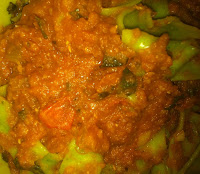
Yummy
  • Tin of peeled whole tomatoes (or you can peel 4 tomatoes, if you do not want the sugar that comes with the tinned ones)
  • A Tin of Lentils (or about ½ a cup soaked overnight in 1 cup of water and a teaspoon of vinegar)
  • Dried powdered Cumin and dried Basil
  • One chopped onion
  • About a teaspoon of crushed garlic
  • A handful of fresh basil
  • Pasta, we used spinach Tagliatelle (made using spinach juice)
  • 2 x teaspoons olive oil
  • Optional ¼ cup red wine

Method

  1. Take medium size saucepan and place on stove, get it warm (should take between 1 and 2 mins)
  2. Add oil, add onions, and cover the onions with oil
  3. This must cook for about 3 mins
  4. While that is busy, blend the tomatoes and lentils, and a teaspoon of cumin, until smooth’ish, not too much (for tins drain the liquid, not completely)
  5. That should not take more than 3 mins.
  6. The onions should be getting clear, no add the garlic and basil and stir that in, simmer for 1mins add red wine cook off for about 1 min
  7. Then add the blended mixture
  8. Simmer for about 15-20 mins (until most of liquid gone)
  9. In the meantime chop the basil
  10. With 5 minutes to go, add boiling water into pot deep enough to cook the pasta (a decent amount) add 1 table spoon salt
  11. Then add the pasta into the pot and turn off and cover the sauce
  12. The pasta we used need 4 mins to cook, once time is up drain in colander and place back over the pasta pot and sprinkle with olive oil
  13. Add chopped basil into the sauce, and stir it in
  14. Serve (with some grated Parmesan if required)
enjoy...

Comments

Popular posts from this blog

Bitcoin / Cryptocurrency – what is it and how can I benefit

What is it I started investigating Bitcoin when it was worth just over $1000 a bitcoin. I was interested in what it was and how it worked. A lot of people are saying we missed the boat, but I believe that everyone should at least try put a little money in now, or at least use a faucet (see below) to make a little micro-currency. You can read a Wiki article about bitcoin and its history etc. But what you need to know is that it is a currency, that is independent of country. No one really knows who invented the concept of a cryptocurrency since the person who published the paper used a nom de plume. All new cryptocurrencies work more or less the same way as Bitcoin. So as I explain below I interchange these terms. Bitcoin is the original cryptocurrency. How Bitcoin works The currency releases a coin based on a mathematical formula. There will never be more than 21 million bitcoins (other cryptocurrencies do not work like this). Each bitcoin can have divided into one hundred mil...

Access conversion NOTE1: default DateSerial in VBA/Access to SQL

I have started slowly converting my Access database to SQL. The reason is that I would like to take the application online. After trying to use Access's (version 2007) transfer tool, which did not work that well. I found Microsoft's SQL Migration Assistant 2008 for Access, nicknamed SSMA. Which you can download here . When you install there is a niggle about the license, which you need to download into their specified directory and it must be the name they provide. So about the create table. My one table would not convert and I could not see why. After looking at the SQL command I saw the problem was the use of DateSerial. I googled a few sites and could not find an answer The CREATE TABLE line was: [RequireUntilDate] datetime2(0) DEFAULT DateSerial(1980,1,1) NOT NULL, I clicked on the whole command and copied it and then in SQL Server Management Studio, I tried to create the table and found that if I specified the date in US date format it worked: [RequireUnti...

SMTP servers of South Africa

SMTP Settings Below is a list of SMTP sites in South Africa, using this and the ISP Map you can try and find which one works best for you. Telkom smtp.saix.net (ADSL) smtp.telkomsa.co.za (56k dial up) smtp.telkomsa.net Internet Solutions smtp.isdsl.net (ADSL) smtp.dial-up.net (56k dial up on IS) smtp.layerone.net (3g backbone) Vodacom smtp.vodacom.co.za smtp.vodamail.co.za MTN smtp.mtn.co.za Cell C smtp.cellc.co.za (GPRS) mail.cmobile.co.za (also used by Virgin) ABSA mail.absa.co.za iBurst smtp.wbs.co.za smtp.iburst.co.za @lantic smtp.lantic.net (ADSL,Dialup, ISDN) Sentech smtp.sentech.co.za MWEB smtp.mweb.net (ADSL) - this is to be retired End June 2012, use below instead smtp.mweb.co.za (56k dial-up & ADSL & business) iAfrica smtp.uunet.co.za smtp.iafrica.com Neotel smtp.neotel.co.za Tiscali NOW MWeb smtp.tiscali.co.za Netactive NOW MWeb smtp.netactive.co.za Global smtp.global.co.za Hertzner Use y...